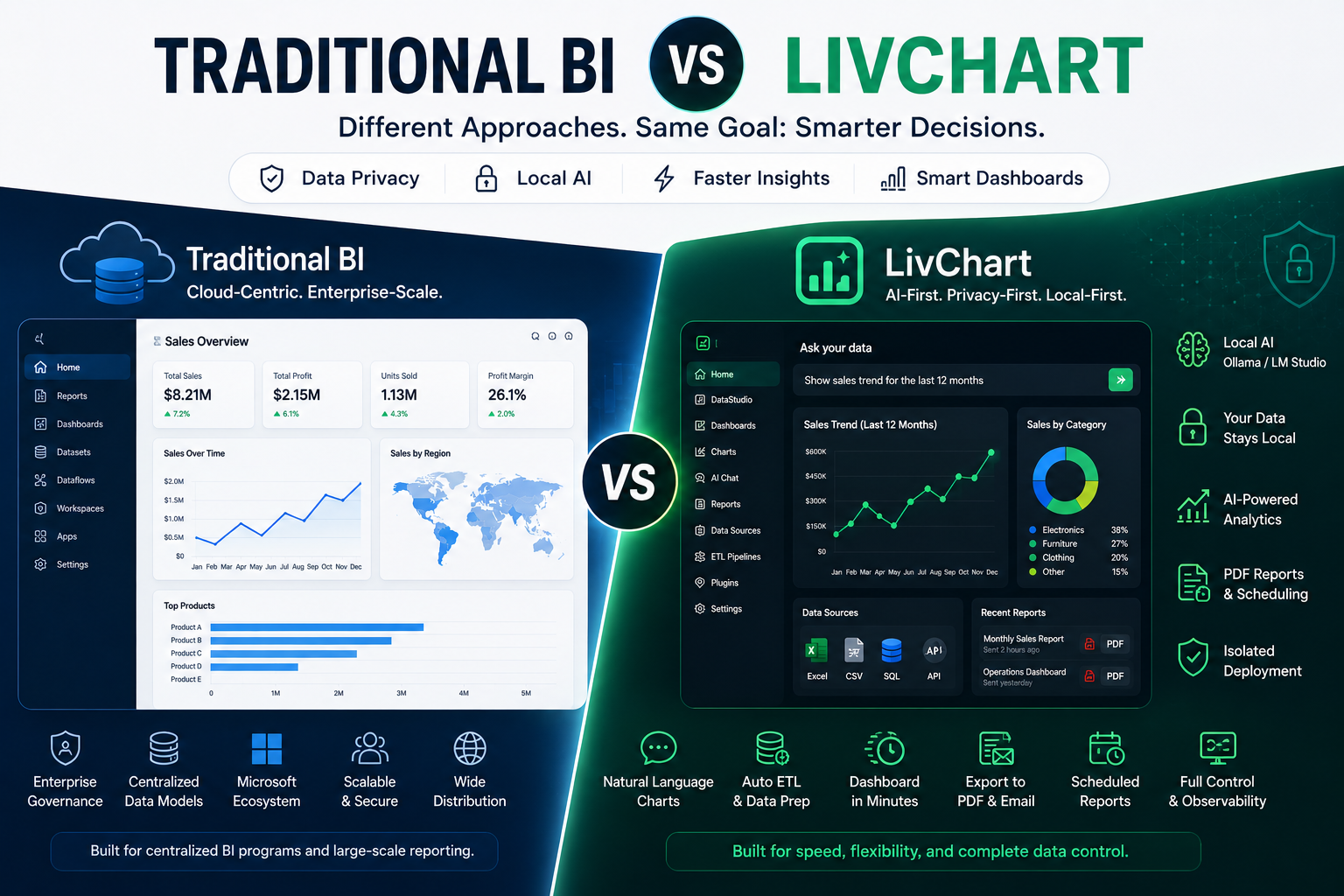
Organizations evaluating analytics platforms often compare established solutions against emerging alternatives.
This comparison looks at how Power BI and LivChart approach business analytics from different perspectives.
The goal is not to declare a winner. Both platforms serve different needs effectively.
Instead, this article examines where each platform excels, where they differ, and which use cases align better with each approach.
Different Design Philosophies
Power BI and LivChart were built with different priorities in mind.
Power BI
Power BI is Microsoft's enterprise business intelligence platform.
It was designed for:
- large-scale corporate reporting
- integration with the Microsoft ecosystem
- centralized dashboard management
- structured data modeling
- established enterprise workflows
Power BI excels in organizations already invested in Microsoft infrastructure.
LivChart
LivChart is a privacy-first analytics platform built around local AI capabilities.
It was designed for:
- local AI-assisted analytics
- data sovereignty and privacy
- natural language dashboard generation
- conversational data exploration
- self-hosted deployment options
LivChart excels in organizations that prioritize data control and AI-assisted workflows.
Feature Comparison
| Feature | Power BI | LivChart |
|---|---|---|
| Primary Approach | Traditional BI | AI-assisted analytics |
| Data Processing | Cloud-first | Local-first option |
| Dashboard Creation | Manual design | AI-assisted generation |
| Query Method | DAX / drag-and-drop | Natural language + manual |
| AI Capabilities | Cloud-based AI features | Local AI integration |
| Data Sovereignty | Depends on deployment | Full local control option |
| Deployment | Cloud or on-premises | Self-hosted |
| Ecosystem Integration | Microsoft 365 | Multiple data sources |
| Mobile Experience | Available | Mobile-first design |
| PDF Reporting | Available via add-ons | Built-in generation |
Data Processing and Privacy
This is where the platforms differ most significantly.
Power BI
Power BI is primarily a cloud-first platform.
Data is typically processed through Microsoft's cloud infrastructure (Power BI Service).
While on-premises options exist (Power BI Report Server), they come with licensing and feature limitations.
Organizations using Power BI's cloud service should consider:
- where data is processed and stored
- which jurisdictions apply
- what data processing agreements are in place
- how data sovereignty requirements are met
LivChart
LivChart offers a local-first approach to data processing.
When using local AI models (via Ollama, LM Studio, or similar), business data remains within the organization's own infrastructure.
This means:
- data never leaves organizational boundaries
- no cross-border data transfer concerns
- no third-party data processing agreements needed
- full audit trail maintained internally
For organizations with strict data sovereignty requirements (KVKK, GDPR, or internal policies), local AI processing provides a simpler compliance path.
AI-Assisted Analytics
Power BI
Power BI offers AI features including:
- automated insights (Quick Insights)
- natural language queries (Q&A feature)
- anomaly detection
- key influencer analysis
These features depend on cloud processing and Microsoft's AI infrastructure.
LivChart
LivChart integrates AI differently.
Users can connect local AI models (such as Ollama with Qwen, Llama, or other models) directly to their data.
This enables:
- natural language dashboard generation
- conversational data exploration
- AI-assisted chart creation
- follow-up analysis without rebuilding dashboards
Because the AI runs locally, all prompts and data interactions stay within the organization's infrastructure.
Dashboard Creation Workflow
Power BI
Power BI follows a traditional BI workflow:
- connect data sources
- build data model (relationships, measures, DAX)
- design visualizations manually
- publish to Power BI Service
- share with stakeholders
This workflow is powerful but requires BI expertise for effective use.
LivChart
LivChart offers an AI-assisted workflow:
- connect data sources
- describe what you want in natural language
- AI generates chart suggestions
- refine and customize as needed
- save and share dashboards
This reduces the technical barrier to dashboard creation significantly.
Use Case Alignment
Power BI Works Well For
- organizations heavily invested in Microsoft ecosystem
- centralized enterprise reporting with established BI teams
- complex data modeling requirements
- organizations comfortable with cloud data processing
- companies needing deep integration with Azure, Dynamics 365, or other Microsoft services
LivChart Works Well For
- organizations with strict data sovereignty requirements
- teams wanting AI-assisted analytics without cloud dependency
- businesses that prefer self-hosted deployment
- companies needing faster, conversational data exploration
- organizations operating under KVKK, GDPR, or similar regulations
Many Organizations Will Use Both
This is not an either-or decision for most companies.
Common patterns include:
- Power BI for structured enterprise reporting and compliance dashboards
- LivChart for operational analytics, AI-assisted exploration, and privacy-sensitive data
Each platform addresses different needs within modern analytics infrastructure.
Compliance Considerations
Organizations operating under data protection regulations should evaluate:
For Power BI
- review Microsoft's data processing terms
- understand where data is processed and stored
- verify compliance with applicable regulations
- consider Power BI Report Server for on-premises requirements
For LivChart
- local AI processing keeps data within organizational boundaries
- no third-party data processing agreements needed for local deployment
- audit trails remain internal
- simpler compliance path for organizations with strict data sovereignty requirements
Final Thoughts
Power BI and LivChart serve different analytics needs.
Power BI remains a strong choice for organizations deeply integrated into the Microsoft ecosystem who need centralized, structured reporting.
LivChart offers an alternative for organizations that prioritize data sovereignty, local AI capabilities, and conversational analytics workflows.
The best approach for most organizations is to evaluate which platform aligns with their specific requirements around data privacy, AI integration, deployment preferences, and analytics workflows.
Both platforms continue evolving, and the analytics landscape is large enough for multiple approaches to coexist effectively.