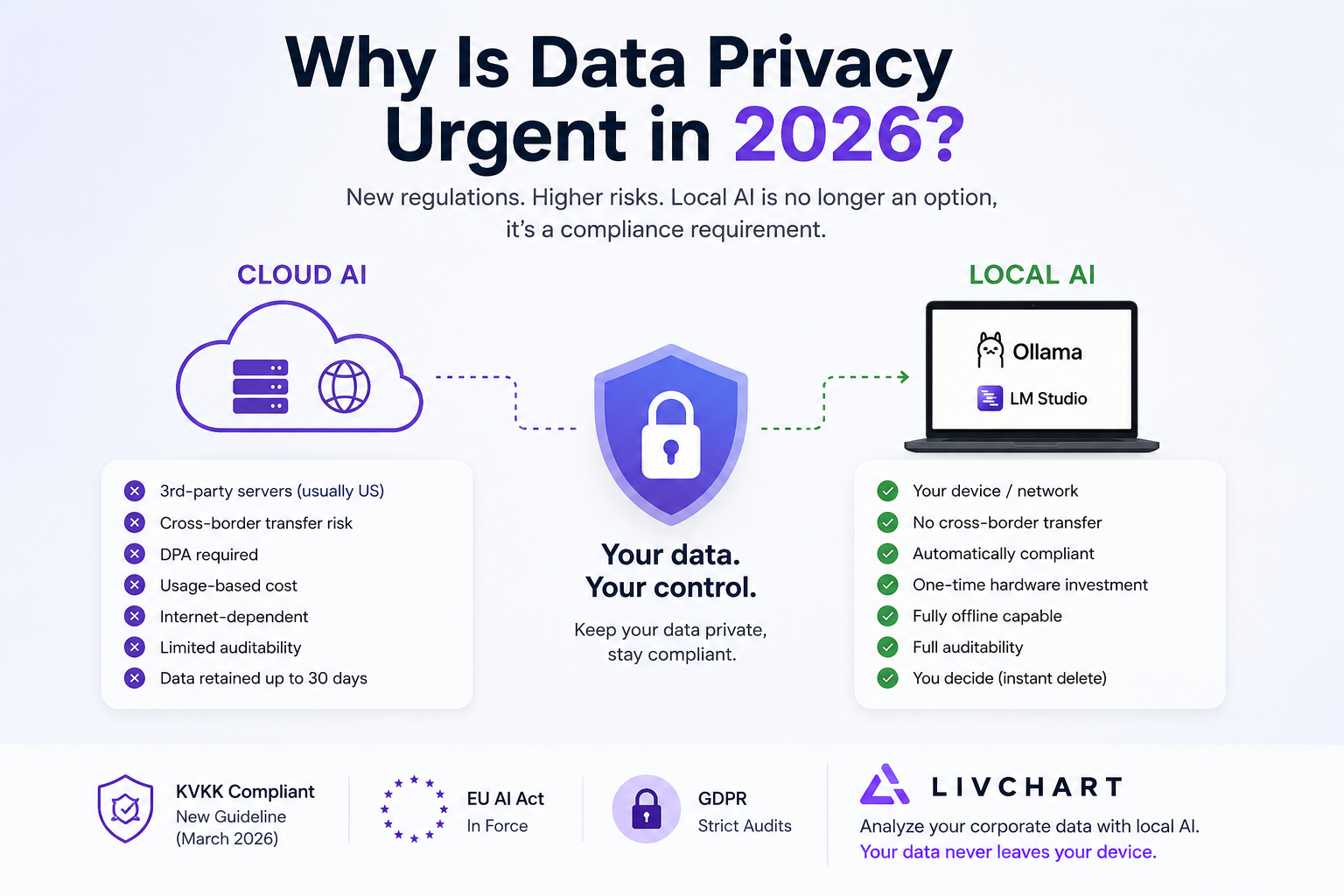
Why Is Data Privacy Urgent in 2026?
In March 2026, KVKK (Turkey's data protection authority) published its "Guideline on Agentic AI Systems." The EU AI Act entered into force. GDPR audits now cover not just email and CRM data, but also the queries you send to AI models.
The reality: Most companies think data privacy means "we'll sign a DPA and move on." But the question you ask a cloud AI tool — "What was the best-selling product in May?" — is itself a corporate data leak.
This article answers two questions:
- What risk are you really taking when your data goes to the cloud?
- Can you realistically reduce that risk to zero with local AI?
What Happens When Your Data Goes to the Cloud?
From a KVKK Perspective
KVKK's 2026 cross-border data transfer regulation is clear: Transferring personal data to a server in a country not on the "adequate protection" list requires explicit consent. Most cloud AI providers have servers in the US — and the US is not on that list.
Practical impact: When your employees' names, sales figures, or customer information reach an OpenAI or Google server, a KVKK non-compliance risk emerges. You can't dismiss this as "user error" — as the data controller, you are responsible.
From a GDPR Perspective
GDPR Article 44 and beyond tightly regulate the transfer of personal data outside the EU. Since Schrems II, Standard Contractual Clauses alone are not sufficient — Supplemental Measures are required.
Even more critical: Under the AI Act, high-risk AI systems require data management transparency. You must not only document what data you send to your model — you must prove how you protect it.
3 Real Scenarios
Scenario 1: Sales Data
A sales manager asks a cloud AI tool: "What's the regional sales distribution for Q1 2026?" This query includes customer names, region-level revenue, and strategic growth plans. The data stays in the cloud for 30 days. If a breach occurs during that period — KVKK administrative fine: up to 1,000,000 TRY.
Scenario 2: HR Data
The HR department analyzes employee performance data with AI. The cloud AI's "training data usage" policy is managed via opt-out. But expecting every employee to know and apply the opt-out option is unrealistic. From a GDPR perspective: The legal basis for data processing is unclear.
Scenario 3: Financial Reports
A CFO asks AI to summarize quarterly financial statements. This data includes banking relationships, investment plans, and competitive strategy. Even if the cloud provider's terms say "your data won't be used for model training" — is it auditable? No.
Two Paths: Cloud AI vs Local AI
| Criteria | Cloud AI | Local AI |
|---|---|---|
| Data Location | 3rd-party servers (usually US) | Your device / network |
| KVKK Compliance | DPA required, cross-border risk | Automatically compliant — data never leaves |
| GDPR Cross-Border | Supplemental Measures required | No cross-border transfer |
| Token Cost | Usage-based, unpredictable | Hardware investment only (one-time) |
| Downtime Risk | Internet-dependent | Fully offline capable |
| Setup Complexity | Easy (enter API key) | Moderate (Ollama/LM Studio setup) |
| Model Selection | Provider's offerings | Any open-source model |
| Auditability | Limited — logs sit with provider | Full — all logs on your server |
| Data Retention | 30 days (most providers) | You decide (instant delete included) |
KVKK/GDPR Compliance with Local AI: Practical Steps
Step 1: Install Ollama
Ollama is an open-source tool that runs large language models on your local machine. Single-command setup:
# macOS / Linux
curl -fsSL https://ollama.com/install.sh | sh

# Pull a model
ollama pull llama3
ollama pull mistral
Once installed, the model runs on your computer. No data leaves the internet.
Step 2: Configure AI Provider in LivChart
In LivChart's AI Provider Settings panel:
- Select Ollama as the provider
- Endpoint:
localhost:11434 - Model: Select your running model (Llama 3, Mistral, Gemma)
- Test the connection
From this point on, all AI queries run locally on your machine.
Step 3: Double-Layer Protection with Data Masking
LivChart offers a "Mask Identifying Data" option before sending data to AI. This automatically masks personal information (names, ID numbers, emails) before feeding it to the model.
Result: Your data already stays local + personal details are protected by masking = KVKK and GDPR compliance is double-layered.
Step 4: SQL Database Connection — Data Stays Local
LivChart connects directly to SQL Server, PostgreSQL, and MySQL. The connection is established over your local network. If your database is on the company server, the data doesn't leave — AI queries run there.
Step 5: PDF Report Generation
When analysis is complete, export results as PDF with your company logo and details. These reports are independent of the AI model — finished output, no cloud dependency.
"But We Already Use Cloud BI" — Migration Guide
You don't need to replace your current Power BI or Tableau infrastructure overnight. Here's a low-risk migration plan:
Phase 1: Hybrid Start (1-2 Weeks)
- Keep your current BI tool
- Download LivChart for free
- Analyze your Excel/CSV files with local AI (trial purpose)
- Compare results
Phase 2: Move Sensitive Data to Local (2-4 Weeks)
- HR data, financial reports, strategic sales info → LivChart + Ollama
- General market analysis, public data → can stay in current cloud BI
- Try your first 100 AI questions with LivAI Cloud — no Ollama setup needed
Phase 3: Full Migration Assessment (1-3 Months)
- Add local AI infrastructure to your KVKK/GDPR audit report
- Calculate token cost savings
- Train your team: natural language querying, dashboard creation
3 Golden Rules
1. Where you analyze your data must be where your data lives.
If your database is on the company server, AI queries should run there too. Sending it to the cloud means sending your data responsibility along with it.
2. Regulations aren't waiting for you.
KVKK's March 2026 guideline, GDPR AI Act compliance — these are not theoretical, they're active audit topics. Non-compliance penalties will increase in Q4 2026.
3. Local AI is no longer a luxury — it's a compliance requirement.
Ollama setup takes 10 minutes. Uploading your Excel and asking AI a question in LivChart takes 2 minutes. Cost: zero (Starter plan). Risk: zero (data stays local). Saying "we're not ready yet" means accepting the risk until an audit arrives.
LivChart lets you analyze your corporate data with local AI. Your data never leaves your device. Download for free or try the live demo.